
/
Grid Block
Grid Block
The main layout block. Creates responsive multi-column grids that adapt to different screen sizes. Most Nova sections start with a Grid Block as their outer wrapper.
WHAT IT CREATES
Column 1
Column 2
Column 3
Mobile: 1 col
→
Desktop: 3 cols
When to use this block
- Creating multi-column section layouts (features, cards, team grids)
- Wrapping page sections with background colors/images
- Controlling max-width and centering of content areas
Columns
Set how many columns appear at each screen size. The grid is mobile-first — the base value applies to small screens, larger breakpoints override upward.
Columns
Sidebar Panel
Mobile
≥640px
≥768px
≥1024px
≥1280px
RESULT
Mobile — 1 column
Tablet — 2 columns
Desktop — 3 columns
Most common setup: 1 column on mobile, 2 on tablet, 3 on desktop. Leave sm and xl empty unless you need fine control.
Gap
Controls the space between columns (horizontal) and rows (vertical).
Gap
Sidebar Panel
Column gap (X)
Row gap (Y)
GAP SCALE
0
0px
2
8px
4
16px
6
24px
8
32px
10
40px
12
48px
16
64px
Responsive overrides available: tablet (gapXMd, gapYMd) and desktop (gapXLg, gapYLg).
Width & Layout
Control how wide the grid is and whether it stretches to the full viewport.
Layout
Sidebar Panel
Max Width
Full Width

Max Width
Limits how wide the grid stretches and centers it. Most Nova patterns use 7xl (1280px). Options range from sm (384px) to screen-2xl (1536px).
Full Width
When on, the grid wrapper stretches edge-to-edge. Use this with a background color or image that should fill the screen. The grid content inside still respects Max Width.
Background
Add a color, gradient, or image behind the grid. Image backgrounds include an overlay control for readability.
Background
Sidebar Panel
Color
Gradient
Image
Overlay Color
Note: Overlay only appears when a background image is set. The overlay sits between the image and your content for better text readability.
Spacing
Padding (inside) and margin (outside) in pixels. Set different values for mobile, tablet, and desktop.
Padding
Sidebar Panel
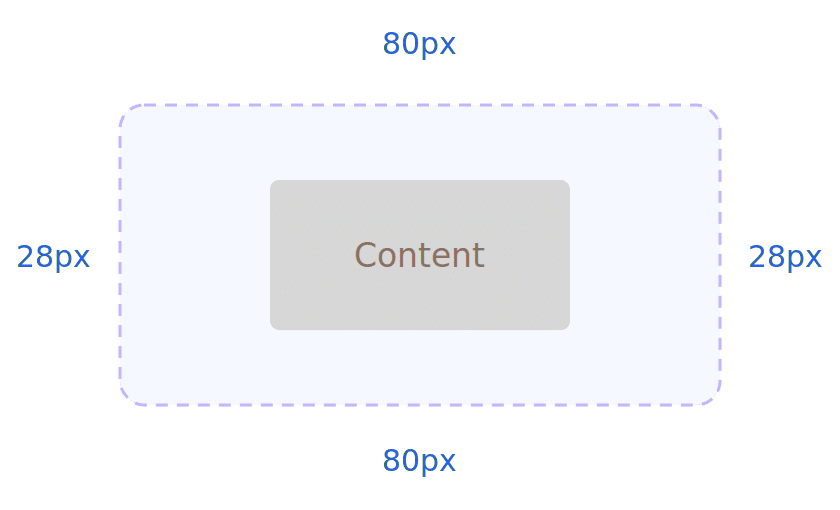
Responsive: separate values for
Mobile
Tablet
Desktop
Margin works the same way — top, bottom, left, right with responsive overrides. All values are in pixels.
Border & Shadow
Add borders, rounded corners, and shadow depth. All responsive per breakpoint.
Border
Width
Color
#E4E4E4
Radius
Shadow
Small
Medium
Extra Large
Options: sm, base, md, lg, xl, 2xl, inner
Border and radius can have different values on mobile, tablet, and desktop. Per-corner radius control is available (e.g., round only the top corners).
Animation
Animation
Fade In

When enabled, the grid fades in as the user scrolls to it. Respects prefers-reduced-motion.
All Available Controls
Complete list of everything you can configure on this block.
Columns 5 breakpoints, 1– 12 columns each

columns (mobile base), columnsSm (≥640px), columnsMd (≥768px), columnsLg (≥1024px), columnsXl (≥1280px). Values: 1 through 12. Default base: 3.
Gap Column & row spacing, 3 breakpoints
gapX / gapY (mobile), plus Md and Lg overrides. Scale: 0, 1, 2, 3, 4, 5, 6, 8, 10, 12, 16. Default row gap: 4 (16px).
Width & Layout Max width, full width toggle
maxWidth: sm (384px) through screen-2xl (1536px). isFullWidth: boolean toggle. When full width is on, the grid content still uses maxWidth for the inner container.
Background Color, gradient, image, overlay
backgroundColor (hex), backgroundGradient (CSS), backgroundImageUrl (from media library). When image is set: overlayColor (hex), overlayGradient (CSS), overlayOpacity (0–10 0, default 50).
Spacing Padding & margin, 3 breakpoints each
Padding: paddingTop/Bottom/Left/Right (mobile), plus Md and Lg . Margin: same pattern. All values in pixels.
Border & Shadow Width, color, radius, shadow presets
Border: borderMobile/Tablet/Desktop (per-side width, color, style). Radius: borderRadiusMobile/Tablet/Desktop (per-corner). Shadow: borderShadow — sm, base, md, lg, xl, 2xl, inner.
Alignment Grid item alignment within the grid
justifyItems / alignItems: start, center, end, stretch. justifyContent / alignContent: start, center, end, between, around, evenly. Not responsive — single value.
Animation Scroll-triggered fade
fadeIn: “fade-in” or empty. Triggers a scroll-based fade animation. Respects prefers-reduced-motion.