
/
Video Lightbox Block
Video Lightbox Block
A clickable trigger — thumbnail or button — that opens a video in a fullscreen modal overlay. Supports YouTube, Vimeo, and self-hosted videos.
TWO DISPLAY MODES
Thumbnail mode
Button mode
Styled button with icon — great for hero sections
When to use this block
- Product demos or explainers that open in a focused overlay
- Hero sections with a “Watch video” button
- Thumbnail galleries that play YouTube/Vimeo on click
- Any video that shouldn’t auto-play inline — user clicks to watch
Display Mode
Choose between a thumbnail with play button or a styled button trigger.
Display Mode
Sidebar Panel
Button mode

Off = thumbnail mode (default). On = button mode. Each mode has its own set of controls.
Video Source
Embed a YouTube or Vimeo video via URL, or use a self-hosted video from the WordPress media library.
Video Source
Sidebar Panel
Source
Video URL
youtu.be/abc123
Supported sources
- Embed: YouTube and Vimeo URLs. Paste the full watch/share URL — it’s auto-parsed.
- Self-hosted: MP4/WebM from WP media library. Video plays directly in the modal.
Thumbnail Settings
In thumbnail mode, configure the background, aspect ratio, corner radius, play button, and duration badge.
Thumbnail
Sidebar Panel
Background type
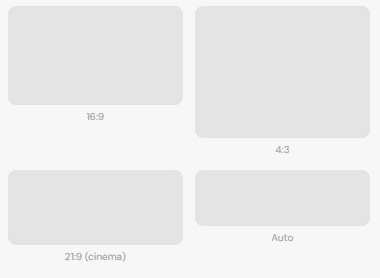
Aspect Ratio
ASPECT RATIOS
Corner Radius
Per-corner, responsive
Top Left
16
Top Right
16
Bottom Left
16
Bottom Right
16
Or set a uniform radius per breakpoint that overrides all 4 corners.
Play Button
Play Button
Size
Background
Arrow Color
Pulse
Custom Icon
PLAY BUTTON SIZES

S (38px)

M (64px)

L (80px)
Duration Badge
Duration
Show Duration
Text
Position
Backgrond
Text Color
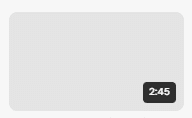
BADGE POSITIONS
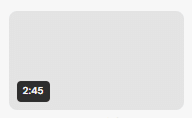
Bottom left
Bottom right (default)
Button Mode
In button mode, the trigger is a styled button with optional icon. Customize text, colors, radius, font size, and padding.
Button
Sidebar Panel
Text
Background
#171717
Radius
px
Font Size
px
Icon Size
BUTTON VARIATIONS
With text + icon
Icon only (empty text)
Modal Behavior
When clicked, the video opens in a fullscreen dark overlay. The modal is created dynamically by JavaScript — it’s not part of the saved HTML.
Close with ESC
Press Escape to close the modal.
Click backdrop
Click outside the video to close.
Singleton
Only one modal can be open at a time.
Spacing
Padding (all 4 sides) and margin. Responsive across breakpoints. Available in both display modes.
Responsive: Mobile Tablet Desktop
All Available Controls
Display Mode Thumbnail or button

displayMode: "thumbnail" (default) or "button". Each mode shows different controls.
Video Source Embed (YouTube/Vimeo) or self-hosted
videoSource: "embed" uses videoUrl (YouTube/Vimeo). "self-hosted" uses videoMediaUrl/videoMediaId from WP media.
Thumbnail Background Image or video, aspect ratio, radius
bgType: "image" or "video" (keep under 1MB). aspectRatio: 16/9, 4/3, 21/9, auto. thumbnailRadiusTL/TR/BR/BL (+Md/Lg) or uniform thumbnailRadiusMobile/Tablet/Desktop.
Play Button Size, colors, pulse, custom icon
playIconSize: sm (48px), md (64px), lg (80px). playBgColor / playArrowColor: button colors. playPulse: animated ring. playIconUrl: custom icon replaces default arrow.
Duration Badge Text, position, colors
showDuration: toggle. durationText: e.g. “2:45”. durationPosition: "right" (bottom-right, default) or "left" (bottom-left). durationBgColor / durationTextColor.
Button Style Text, colors, radius, size — button mode only
buttonText (empty = icon-only), buttonTextColor, buttonBgColor, buttonBorderRadius (default 999 = pill), buttonFontSize, buttonPaddingV / buttonPaddingH. Button icon: btnIconSize (sm 28px, md 40px, lg 64px), btnIconBgColor, btnArrowColor, btnIconPulse.
Spacing Padding & margin, 3 breakpoints
Padding: paddingTop/Bottom/Left/Right (+Md/Lg) in px. Margin: marginMobile/Tablet/Desktop (objects).