
/
Image Block
Image Block
Display images from the WordPress media library with full control over sizing, object-fit, border radius, hover animations, and an optional text overlay. Supports responsive srcset for optimized loading.
COMMON USES
Rounded photo

Circular avatar

With text overlay
When to use this block
- Photos, illustrations, logos, and screenshots
- SVG icons and graphics with custom background/border
- Images with hover zoom or scale animations
- Images with text overlays (badges, category labels)
Object Fit
Controls how the image fills its container. Most commonly used with cover to crop images to a consistent aspect ratio.

Cover
Fills & crops

Contain
Fits inside, may letterbox

Fill
Stretches to fill
All options: cover, contain, fill, none, scale-down. When set, the wrapper also gets width:100%; height:100% so the image can fill its parent.
Object Position
When using object-fit: cover, control which part of the image stays visible. Defaults to center.
top left
top
top right
left
center
right
bottom
bottom left
bottom right
Max Width & Height
Constrain the image dimensions in pixels. Responsive across breakpoints. Useful for logos, avatars, or thumbnails that shouldn’t stretch full-width.
Size
Sidebar Panel
Max Width
px
Max Height
px
Responsive: Mobile Tablet Desktop
Border Radius
Round image corners individually per breakpoint. Set all 4 corners to the same value for a uniform radius, or mix values for creative shapes.
Border Radius
Sidebar Panel
Top Left
12
Top Right
12
Bottom Left
12
Bottom Right
12
EXAMPLES

12px

50%

Mixed
Responsive: Mobile Tablet Desktop
Hover Animation
Add a subtle hover effect to images. Two presets available.
Hover Zoom

Image scales up slightly on hover
Hover Scale
Entire block scales on hover
Text Overlay
Show a label or badge positioned over the image. Choose from 9 positions. The overlay has its own typography, background, padding, margin, border, and radius controls.
Overlay Text
Sidebar Panel
Enable

Text
Position
Text Color
#FFF
Background
#171717
9 POSITIONS
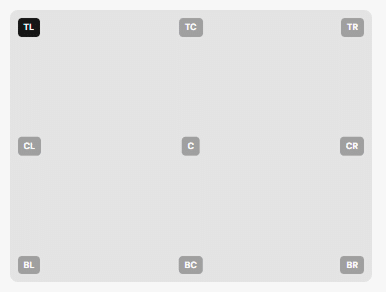
Overlay has its own responsive padding, margin, border, and radius. Choose from 9 positions: top-left, top-center, top-right, center-left, center, center-right, bottom-left, bottom-center, bottom-right.
SVG Styling
When the uploaded image is an SVG, additional controls appear for background fill color and border.
SVG Options
Only for SVG images
Background Color
#F7F7F7
Border Color
#E4E4E4
Border Width
px
These controls only appear when the image MIME type is image/svg+xml. SVG images also get a w-fit class instead of full-width.
Spacing
Padding and margin. Responsive across breakpoints. Margin uses per-breakpoint objects (top/right/bottom/left).
Responsive: Mobile Tablet Desktop
No border or shadow on this block (except for SVGs and the overlay). Use border radius for rounded corners. Use a parent Grid Item for full border/shadow support.
All Available Controls
Image Upload / media library, alt text, srcset

mediaUrl, mediaId, mediaAlt. mediaSrcset and mediaSizes are auto-generated when selecting from the media library. Block renders nothing if mediaUrl is empty.
Object Fit & Position How the image fills its container
objectFit: cover, contain, fill, none, scale-down. objectPosition: center, top, bottom, left, right, and diagonal combinations (left-top, right-bottom, etc.).
Max Width & Height px — 3 breakpoints
maxWidth / maxHeight (+Md/Lg). Value in px. Applied to the <img> tag directly.
Border Radius Per-corner, 3 breakpoints
borderRadiusMobile/Tablet/Desktop: objects with topLeft, topRight, bottomRight, bottomLeft (px values).
Hover Animation Zoom or scale on hover
animation: "hover" (image zooms inside its container), "scale" (entire block scales up). Empty for no animation.
Text Overlay Badge/label with 9 positions
overlayTextEnabled: toggle. overlayText: label content. overlayTextPosition: 9 positions (top-left through bottom-right). Plus its own font weight/size/line height/color, background color, padding, margin, border, and radius — all responsive.
SVG Styling Background fill & border (SVGs only)
svgBgColor, svgBorderColor, svgBorderWidth. Only available when mimeType is image/svg+xml. Applied to the wrapper div, not the <img>.
Spacing Padding & margin, 3 breakpoints
Padding: paddingTop/Bottom/Left/Right (+Md/Lg) in px. Margin: marginMobile/Tablet/Desktop (objects with top/right/bottom/left).